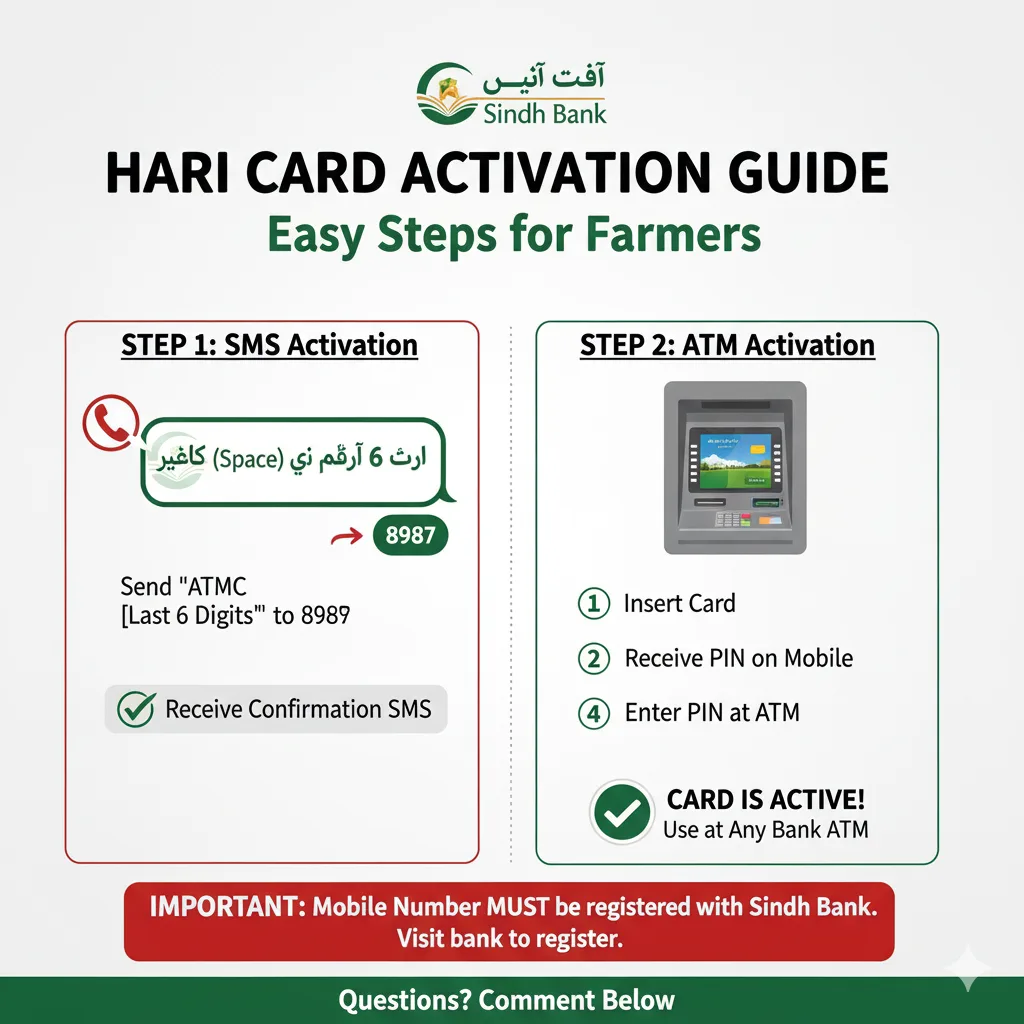
How to Activate Your Hari Card (Sindh Bank ATM Card): A Step-by-Step Guide
Introduction:
For all farmers (Abadgar) who have received their Hari Cards, please note that this card is essentially an ATM card. It is crucial to activate (Active) your Hari Card to ensure you can use it easily and access its benefits. This guide provides a simple, step-by-step process to activate your card.
Key Highlights of Hari Card Activation:
Purpose: The Hari Card is an ATM card for easy financial transactions.
Requirement: Activation is mandatory for usage.
Bank: Primarily associated with Sindh Bank.
Prerequisite: Your mobile number must be registered with Sindh Bank.
Step-by-Step Guide to Activate Your Hari Card:
Follow these instructions carefully to activate your Hari Card:
Part 1: SMS Activation (If your registered number is with Sindh Bank)
Send an SMS: From your registered mobile number, send an SMS in the following format to 8987: ATMC (Space) Last 6 Digits of your Hari Card Example: If the last 6 digits of your Hari Card are 123456, send ATMC 123456 to 8987.
Confirmation Message: After sending the SMS, you will receive a confirmation message acknowledging your request.
Part 2: ATM Activation & PIN Setup
Visit a Sindh Bank ATM: Go to any Sindh Bank ATM machine.
Insert Your Card: Insert your Hari Card into the ATM.
Receive PIN: A temporary PIN code will be sent to your registered mobile number.
Enter & Set New PIN: Enter the received temporary PIN into the ATM. You will then be prompted to set a new PIN of your choice. Set a strong and memorable PIN.
Part 3: Ready to Use!
Universal Usage: After successfully setting your new PIN, you can use your Hari Card at any bank’s ATM machine.
Important Note on Mobile Number Registration:
Crucial Step: If your mobile number is not registered with Sindh Bank, the Hari Card will not activate.
Action Required: Please visit your nearest Sindh Bank branch first to register your mobile number.
For Those Who Already Have a PIN/Password:
If you have already received a PIN/password for your Hari Card, you can either continue using it or choose to change it using the same activation method described above.
Need Assistance?
If you have any questions or require further clarification, please leave a comment below. If you found this post helpful, don’t forget to share it with others!
Frequently Asked Questions (FAQs) about Hari Card Activation:
Q1: What is a Hari Card? A1: The Hari Card is an ATM card issued to farmers (Abadgar), designed to facilitate easy financial transactions.
Q2: Why do I need to activate my Hari Card? A2: Activation is necessary to enable the card for use, allowing you to withdraw cash and perform other transactions at ATMs.
Q3: What is the first step to activate the Hari Card via SMS? A3: Send an SMS from your registered mobile number to 8987, in the format: ATMC (Space) Last 6 Digits of your Hari Card.
Q4: What happens after I send the SMS? A4: You will receive a confirmation message, and then you need to visit a Sindh Bank ATM to complete the activation and set your PIN.
Q5: What if my mobile number is not registered with Sindh Bank? A5: You must first visit a Sindh Bank branch to register your mobile number. The Hari Card cannot be activated without a registered mobile number.
Q6: Can I use my Hari Card at any ATM after activation? A6: Yes, once activated and your new PIN is set, you can use your Hari Card at any bank’s ATM machine.
Q7: I already have a PIN. Can I change it using this method? A7: Yes, if you have an existing PIN, you can use this method to change it to a new one of your choice.
Q8: Where can I get help if I encounter problems? A8: You can leave a comment with your question, or contact Sindh Bank directly for assistance.